Evaluating Autumn Leaves Brushes for Photoshop and Procreate
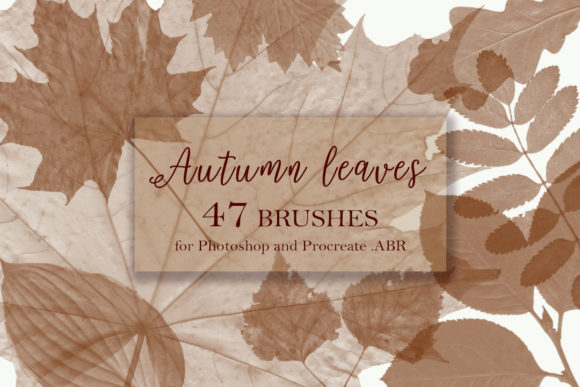
Digital artists seeking to capture the essence of the fall season often face the challenge of replicating organic textures without spending hours painting individual details. The Autumn Leaves Brushes for Photoshop and Procreate collection offers a specialized solution designed to streamline this process. This set includes 47 distinct leafprint brushes provided in the standard .ABR format, ensuring compatibility across major digital art platforms. For creators evaluating whether this toolset aligns with their workflow, understanding the specific capabilities, installation requirements, and artistic applications is essential before making a selection.
Understanding the Toolset and Compatibility
At its core, this collection is a resource for adding realistic foliage elements to digital compositions. The package is delivered as a single ZIP folder containing 47 unique brush presets. A significant technical advantage of this set is its file format; the brushes are saved as .ABR files. While traditionally associated with Adobe Photoshop, this format is also natively supported by Procreate on iPad, allowing for a seamless cross-platform workflow. Users do not need to convert files or manage multiple formats for different devices, as the entire library can be installed from one file source.
The primary function of these brushes is to serve as stamping tools or texture generators. Unlike standard round brushes used for sketching or coloring, these are shaped specifically to mimic various stages of autumn foliage. The preview materials typically included with such sets allow users to assess the scale and resolution of the leaf prints. It is important for potential users to review these previews to ensure the pixel density matches their intended canvas size, particularly if working on large-format prints where low-resolution stamps might appear pixelated.
Artistic Applications and Benefits
There are several compelling reasons why an artist might integrate Autumn Leaves Brushes for Photoshop and Procreate into their toolkit. The most immediate benefit is efficiency. Hand-painting hundreds of individual leaves to create a dense forest floor or a falling leaf effect can be time-consuming. These brushes allow for rapid placement of complex shapes, enabling artists to build up layers of foliage quickly. This is particularly useful for concept artists working under tight deadlines or illustrators who need to establish a seasonal mood board rapidly.
Beyond speed, the variety within the 47-brush set offers textural diversity. Autumn leaves vary significantly in shape, curl, and decay. A robust brush set should include variations that represent crisp maple leaves, curled oak leaves, and perhaps even partially decomposed foliage. This range allows for more dynamic compositions where the foreground elements can differ from the background, creating a sense of depth. When used with opacity pressure settings, these brushes can simulate the translucency of thin leaves or the heaviness of wet foliage, adding a layer of realism that flat colors cannot achieve.
Furthermore, these tools are not limited to landscape painting. Graphic designers often utilize leaf textures for seasonal marketing materials, social media graphics, or web banners. The ability to quickly scatter leaves around text or frame an image can elevate a design project without requiring advanced illustration skills. For photographers engaging in digital compositing, these brushes can help blend separate image elements by adding matching foreground debris that ties the composition together.
Considerations and Limitations
While the convenience of stamp brushes is clear, there are tradeoffs to consider. The primary limitation of pre-made leaf brushes is the potential for repetition. If an artist uses the same few brushes repeatedly without variation in rotation, scale, or color, the resulting artwork can look artificial and patterned. To mitigate this, users must actively engage with the software's dynamics settings. In Photoshop, this involves adjusting shape dynamics, scattering, and color jitter. In Procreate, similar streamline and pressure curve adjustments are necessary. The brushes provide the shape, but the artist must provide the randomness to maintain realism.
Another consideration is the resolution dependency mentioned earlier. Since these are raster-based stamps, their quality is fixed at the time of creation. If a user attempts to scale a small leaf brush up to a massive size, it may lose definition. Therefore, this toolset is best suited for projects where the final output dimensions are known in advance, or for artists who are comfortable working at high resolutions (e.g., 300 DPI or higher) to preserve detail. Those who require infinitely scalable vector graphics for large-scale signage might find that dedicated vector leaf assets are a more appropriate alternative.
Additionally, while the .ABR format is widely supported, the behavior of the brushes can sometimes differ slightly between Photoshop and Procreate due to how each engine interprets brush dynamics. Users transitioning between devices should test the brushes in their specific environment to ensure the pressure sensitivity and flow behave as expected. The "install in one file" feature simplifies the setup, but it does not guarantee identical performance across all hardware configurations.
Ideal Use Cases vs. Alternatives
This collection is a strong fit for digital painters, matte painters, and illustrators who prioritize natural environments. It is particularly valuable for those creating storybook illustrations, fantasy landscapes, or atmospheric backgrounds where foliage plays a supporting but crucial role. It is also highly recommended for hobbyists who want to enhance their autumn-themed personal projects without needing to master complex botanical drawing techniques.
However, alternatives may be worth considering for specific needs. If the goal is to create a stylized, cartoonish look where leaves are simplified into geometric shapes, a custom-drawn brush set or a vector pack might offer more control over the aesthetic. Similarly, 3D artists who rely on particle systems to generate forests might find that 2D brushes do not integrate well with their 3D pipelines unless used strictly for post-production overlays. For users who need to animate falling leaves, dedicated video assets or particle plugins might offer more fluid motion than frame-by-frame animation using static brushes.
Making an Informed Decision
Selecting the right digital assets requires balancing immediate utility with long-term versatility. The Autumn Leaves Brushes for Photoshop and Procreate set provides a focused, efficient method for adding seasonal texture to digital art. Its strength lies in the breadth of the 47 included variations and the cross-platform compatibility of the .ABR format. However, its effectiveness ultimately depends on the user's willingness to manipulate brush settings to avoid repetitive patterns and their attention to resolution requirements.
For artists who frequently work with nature themes or need to produce seasonal content quickly, this toolset represents a practical investment that can significantly reduce production time. Conversely, those who require vector scalability or highly specific stylization may need to supplement these brushes with other resources. By reviewing the provided size previews and understanding the technical nuances of .ABR files, creators can determine if this collection aligns with their specific artistic goals. Should any questions arise regarding installation or usage, direct communication with the creator, Svetlana, is encouraged to ensure a smooth integration into your creative workflow.