Evaluating Procreate Thank You Stamp Brushes for Digital Workflow Efficiency
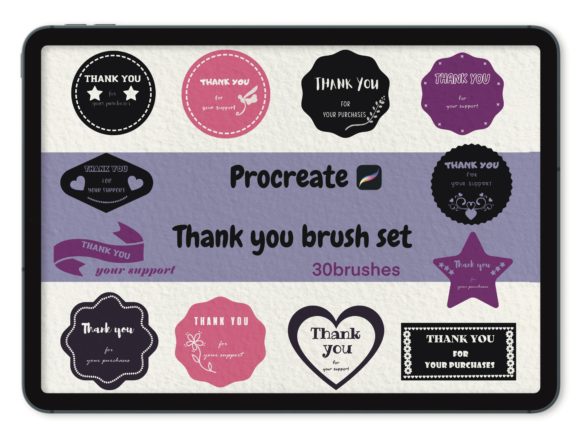
In the fast-paced environment of digital illustration and graphic design, efficiency often dictates the quality of a professional's output. For artists utilizing the iPad ecosystem, specifically within the Procreate application, the integration of specialized assets can significantly streamline repetitive tasks. One such asset category gaining traction among freelancers and small business owners is the Procreate Thank You Stamp Brushes collection. These tools are designed to replace manual lettering or generic text boxes with stylized, hand-drawn elements that convey gratitude to clients and customers. However, before integrating a specific set, such as the 30-brush collection from Infinity Art Works, into a permanent workflow, it is essential to evaluate how these stamps compare to alternative methods, understand their technical limitations, and determine if they align with your specific artistic needs.
Defining the Utility of Stamp Brushes in Professional Contexts
At their core, Procreate Thank You Stamp Brushes are pre-rendered digital images mapped to a brush engine. Unlike standard drawing brushes that respond dynamically to every stroke variation to create unique lines, stamp brushes deposit a static or semi-static image each time the canvas is tapped. The primary distinction of a dedicated "Thank You" set lies in its curation. Rather than searching through general icon libraries or attempting to hand-letter the phrase repeatedly, these collections offer a variety of typographic styles—ranging from modern sans-serifs to whimsical scripts and bold block letters—all optimized for the Procreate interface.
The value proposition here is consistency and speed. For professionals who deliver custom illustrations, portraits, or design assets to clients, including a personalized "Thank You" note within the final file or on a separate card adds a layer of professionalism and warmth. Using a high-quality stamp brush ensures that this sentiment looks intentional and artistically cohesive with the rest of the work, rather than appearing as an afterthought typed in a system font.
Comparative Analysis: Stamps vs. Manual Lettering and Text Tools
When deciding whether to invest in a specific brush set like the 30 brushes included in the Infinity Art Works collection, it is helpful to weigh them against the two primary alternatives: manual hand-lettering and Procreate's native text tool.
Manual Hand-Lettering: Creating a unique "Thank You" message by hand offers the highest degree of customization. It allows the artist to match the exact line weight, texture, and flow of the main illustration. However, this approach is time-consuming. If an artist sends out ten commissions a week, hand-lettering a gratitude message for each one can accumulate significant hours over a month. Furthermore, maintaining consistency across different projects can be challenging if the artist's style fluctuates or if they are fatigued. Procreate Thank You Stamp Brushes sacrifice total uniqueness for repeatability and speed, providing a consistent brand voice without the time investment.
Native Text Tool: Procreate includes a robust text engine that allows for vector-based editing and access to installed system fonts. While this is excellent for crisp, scalable typography, it often lacks the organic, hand-crafted feel that many digital painters strive for. System fonts can appear sterile or disconnected from a painted illustration. Stamp bridges fill this gap by offering the aesthetic of hand-drawn lettering with the ease of a single tap. The trade-off is scalability; while text layers remain editable, stamp brushes rasterize upon placement, meaning the size and color must be finalized before merging layers or resizing significantly to avoid pixelation.
Technical Compatibility and Installation Protocols
Understanding the technical requirements is a critical step in the evaluation process. The Procreate Thank You Stamp Brushes are not standalone applications; they are dependent files that require the host Procreate app to function. Specifically, these digital brushes are engineered for the iPad ecosystem, requiring an iPad Pro, standard iPad, or iPad Mini paired with an Apple Pencil or a third-party stylus that supports pressure sensitivity.
The installation process is straightforward but requires attention to detail to ensure the files are recognized correctly. Upon purchasing a set, such as the collection from Infinity Art Works, the user receives an email containing a download link. The workflow involves downloading the file directly to the iPad, opening the Procreate app, navigating to the Brush Library, tapping the import icon, and selecting the downloaded file. It is important to note that these brushes will only work within the Procreate app. They are incompatible with desktop software like Adobe Photoshop or Illustrator unless those programs have specific bridge plugins or if the user exports the stamp images individually, which defeats the purpose of the brush engine integration.
Assessing Variety and Versatility Within a Set
A common pitfall when purchasing digital assets is acquiring a set that lacks variety. A robust collection, such as the mentioned set containing 30 brushes, provides a necessary range of options. This volume allows an artist to select a style that matches the mood of each specific project. For instance, a playful children's book illustration might call for a bubbly, rounded "Thank You" stamp, whereas a corporate logo design might require a sleek, minimalist version.
When evaluating a set, consider the diversity of the strokes. Do the brushes simulate different media, such as ink, marker, or chalk? Are there variations in orientation, or are they all horizontal? A well-curated set saves the user from needing to purchase multiple packs for different clients. The ability to toggle between thirty distinct styles within a single folder enhances workflow fluidity, allowing the artist to experiment rapidly during the final stages of a project without breaking their creative focus.
Limitations and Decision Factors
Despite their utility, Procreate Thank You Stamp Brushes are not a universal solution for every designer. There are specific scenarios where they may not be the right choice.
- Customization Constraints: If a client requests a specific spelling variation (e.g., "Thanks" instead of "Thank You") or a specific language translation, a pre-made stamp brush is useless. In these cases, manual lettering or the text tool remains superior.
- Resolution Dependence: Since stamp brushes are raster-based, their quality is tied to the resolution at which they were created. While most professional sets are optimized for high-resolution canvases, extreme upscaling can lead to blurriness. Users working on massive print banners should verify the DPI of the source stamps.
- Style Mismatch: If an artist's personal style is hyper-realistic or strictly geometric, a hand-drawn stamp might look out of place. The aesthetic of the brush must complement the existing artwork rather than clash with it.
Furthermore, users must consider the long-term value. Digital trends shift, and a specific style of lettering may feel dated in a few years. Investing in a classic, versatile set is generally safer than choosing something overly trendy.
Making an Informed Choice
Ultimately, the decision to integrate Procreate Thank You Stamp Brushes into your toolkit depends on your volume of work and your desire for stylistic consistency. For high-volume creators who value the personal touch of hand-drawn elements but cannot afford the time to letter every message, these brushes offer an optimal balance. They serve as a force multiplier, allowing for rapid deployment of professional-grade finishing touches.
However, for artists who prioritize total control over every pixel or who frequently work with non-standard text requirements, relying solely on stamps may be limiting. The ideal approach for many professionals is a hybrid workflow: using stamp brushes for standard client deliveries to save time, while reserving manual lettering for high-ticket projects that demand bespoke details. By understanding the strengths and trade-offs of tools like the Infinity Art Works collection, designers can make strategic choices that enhance both their productivity and the perceived value of their services.