Sweet Stamps Brushes for Procreate: A Creative Guide
Imagine being able to decorate a digital invitation, design a whimsical menu, or add the perfect finishing touch to an illustration in seconds rather than hours. This is the core promise of the Sweet Stamps Brushes for Procreate. Designed specifically for the iPad ecosystem, this collection transforms your digital canvas into a bakery of creative possibilities. Whether you are a seasoned graphic designer looking to speed up your workflow or a hobbyist eager to create cute artwork for social media, these tools offer a delightful way to enhance your projects without needing advanced drawing skills.
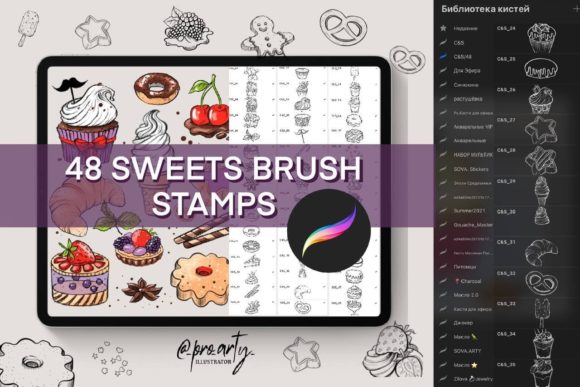
At its heart, this set includes 48 unique stamp brushes that cover a wide array of confectionery and breakfast themes. From fluffy cupcakes and dripping ice cream cones to scattered berries, cinnamon sticks, and flaky croissants, every element is pre-drawn and ready to use. The primary appeal lies in efficiency and charm. Instead of spending time rendering realistic textures for nuts, cookies, or dollops of cream, you can simply tap your screen to place these high-quality elements exactly where they are needed. This allows you to focus on composition and storytelling while the brushes handle the detailed artistry.
Why Choose Stamp Brushes for Your Digital Art?
The modern creator often balances multiple roles. You might be a small business owner managing your own branding, a teacher creating engaging classroom materials, or a blogger designing eye-catching Instagram posts. In these scenarios, time is a valuable currency. The Sweet Stamps Brushes for Procreate address the need for speed without sacrificing aesthetic quality. By using ready-made stamps, you bypass the learning curve associated with painting complex food items from scratch.
Furthermore, consistency is key in professional design. When creating a pattern for packaging or a series of stories for a children's party, having a unified style across all your elements ensures a polished look. This brush set provides that cohesion. Every item, whether it is a sprinkle or a donut, shares a compatible artistic style, making it easy to layer them together into a harmonious design. For beginners, this is particularly empowering; it allows you to produce work that looks professional and intentional, even if your freehand drawing skills are still developing.
Essential Compatibility and Requirements
Before diving into your new creative toolkit, it is crucial to understand the technical environment required to run these tools effectively. The Sweet Stamps Brushes for Procreate are engineered exclusively for the Procreate app on the iPad. It is important to note that these files will not work in Adobe Photoshop, Clip Studio Paint, or any other desktop or mobile application. They are formatted specifically as a .brushset file, which is native to the Procreate ecosystem.
To get the most out of this experience, using an Apple Pencil is highly recommended. While you can navigate the app with your finger, the precision and pressure sensitivity offered by the Apple Pencil allow for better control when placing stamps, resizing elements, or mixing them with other brush strokes. Ensure your iPad is updated to a version of Procreate that supports imported brush sets. Once you have the app and the device ready, importing the set is a seamless process—simply tap the file, and it will automatically populate your brush library.
Practical Applications for Creators and Entrepreneurs
The versatility of this 48-brush collection extends far beyond simple doodling. Here are several practical ways different users can leverage these sweet tools:
- Event Planning and Stationery: If you are organizing a birthday party, baby shower, or wedding, you can quickly design custom invitations and menus. Use the cake and cupcake stamps to frame text or create borders that match the event's theme.
- Social Media Content: Bloggers and influencers can use the ice cream and sprinkles to create engaging story highlights, post headers, or promotional graphics for food-related content. The vibrant nature of these stamps grabs attention in a crowded feed.
- Product Packaging: Small business owners selling baked goods, coffee, or artisanal treats can design their own labels and packaging mockups. The realistic texture of the cinnamon and nuts adds an appetizing feel to product visuals.
- Educational Materials: Teachers and educators can create fun worksheets, reward charts, or presentation slides for younger students. The friendly, approachable style of the brushes makes learning materials more inviting.
- Pattern Design: By repeating and rotating the cookie, berry, and cream stamps, you can generate seamless patterns for textiles, wallpapers, or digital backgrounds.
Unleashing Your Imagination
While the set comes with 48 predefined shapes, your creativity is the only real limit. You are not restricted to using the stamps exactly as they appear. In Procreate, you can change the color of any stamp using the clipping mask feature or adjustment tools. Want a blue cupcake instead of pink? Simply paint over it. Need a giant donut for a surreal artwork? Scale it up without losing quality. You can also combine these sweet elements with hand-drawn lines, watercolor washes, or typography to create entirely unique compositions.
The joy of this set lies in its ability to spark ideas. Sometimes, placing a random "croissant" stamp on the canvas can inspire a whole new layout for a café logo or a morning routine vlog thumbnail. It serves as a visual prompt, encouraging you to experiment with layouts you might not have considered otherwise.
Getting Started and Sharing Your Work
Once you have imported the .brushset file, open your brush library in Procreate and look for the new folder titled with the set name. You will see all 48 brushes organized for easy access. Start by creating a new canvas and experimenting with the size and opacity of different stamps. Try layering a "cream" stamp under a "berry" stamp to build a dessert scene, or scatter "sprinkles" across a background for a festive texture.
As you create, remember that the digital art community thrives on sharing. If you create something awesome using these tools, consider sharing it on Instagram. Using the tag paintwith_pro_arty_ in your post connects you with the creator and fellow users. It is a wonderful way to receive feedback, find inspiration from others, and see how different artists interpret the same set of tools. Watching how others utilize the brushes can provide new insights into techniques you haven't tried yet.
In summary, the Sweet Stamps Brushes for Procreate offer a specialized, efficient, and charming solution for anyone looking to add a touch of sweetness to their digital projects. Whether you are designing for a client, planning a personal event, or just exploring the joys of digital illustration, this set provides the building blocks for delightful artwork. With the right iPad setup and a bit of imagination, you can turn simple taps into stunning visual stories.