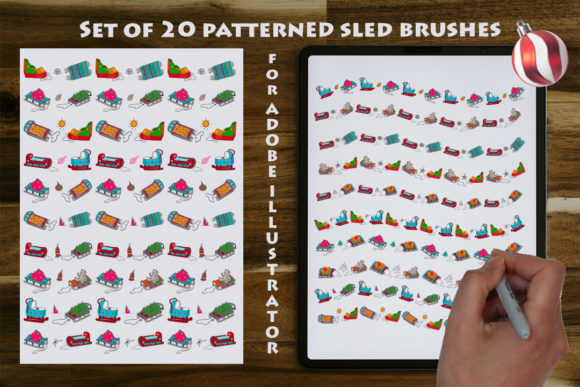
Mastering Festive Design with a Set of 20 Patterned Sled Brushes for Adobe Illustrator
The holiday season presents a unique set of challenges and opportunities for graphic designers, illustrators, and small business owners. As the demand for seasonal content surges across invitations, packaging, social media, and merchandise, the need for efficient yet high-quality design assets becomes paramount. While hand-drawing every decorative element ensures uniqueness, it is often time-prohibitive when facing tight deadlines. This is where specialized digital tools transform the workflow. A Set of 20 Patterned Sled Brushes offers a sophisticated solution, bridging the gap between custom illustration speed and professional vector quality. These assets are not merely pre-made images; they are dynamic, adjustable tools designed to integrate seamlessly into the Adobe Illustrator ecosystem.
The Mechanics of Seamless Vector Art Brushes
To fully leverage these tools, one must understand the underlying technology of Adobe Illustrator art brushes. Unlike standard raster stamps found in pixel-based editing software, the brushes in this collection are vector-based. This distinction is critical for professional output. When you apply one of the seamless pattern brushes featuring sleighs and Christmas toy decorations to a path, the software dynamically stretches and repeats the artwork along that line without losing resolution.
The "seamless" nature of these brushes means that the transition between repeated elements—such as the gap between two sleds or the connection point of a garland—is mathematically calculated to be invisible. This allows designers to draw a path of any length, from a tiny icon border to a massive banner spanning a building wrap, and the pattern will tile perfectly without visible breaks or pixelation. Because the source material is vector, the final output remains crisp at any scale, ensuring that prints on large format posters or small business cards maintain their sharpness.
Furthermore, the flexibility of these brushes extends beyond simple repetition. In Adobe Illustrator CC and newer versions, users can access the Stroke panel to manipulate the profile of the brush. This means a single path can vary in thickness, causing the sleds or toys to appear larger or smaller along the curve, adding a sense of depth and organic movement that static images cannot achieve. The ability to edit the shape, size, and color of the applied brush instantly empowers creators to iterate on designs rapidly.
Versatility Across Professional and Personal Projects
The utility of a Set of 20 Patterned Sled Brushes extends far beyond simple holiday greetings. For professionals in the branding and marketing sectors, these tools provide a rapid way to establish seasonal themes without compromising brand identity. Consider a logistics company wanting to update their fleet graphics or website headers for December. By applying a seamless brush of sleighs along a curved path, they can create a custom border that feels bespoke rather than generic.
- Packaging and Product Design: Manufacturers of seasonal goods can use these brushes to create repeating patterns for box lids, gift tags, and wrapping paper. The EPS 10 format ensures compatibility with various vector programs used in industrial printing workflows.
- Textile and Apparel: The fashion industry relies heavily on seamless repeats. These brushes can be expanded and arranged to create all-over prints for T-shirts, holiday sweaters, or decorative pillows. The vector nature allows print houses to separate colors easily for screen printing processes.
- Invitations and Stationery: Wedding planners and stationers often face a rush of holiday party invitations. Using these adjustable brushes, a designer can frame a photo or text block with intricate borders of Christmas toys in seconds, adjusting the color palette to match specific party themes like "Gold and White" or "Traditional Red and Green."
- Digital Media and Web: For web designers, these vectors can be exported as SVGs to create lightweight, scalable decorative elements for website headers, email newsletters, and social media graphics, ensuring fast load times and retina-display clarity.
Educators and researchers focusing on visual communications can also utilize these sets to teach the principles of pattern making and vector manipulation. By deconstructing how the brush interacts with the path, students gain a deeper understanding of how software handles repetitive geometry and stroke attributes.
Technical Compatibility and File Formats
A significant advantage of this specific collection is its thoughtful approach to file compatibility. In the fragmented landscape of creative software versions, accessibility is key. The primary delivery method is an Adobe Illustrator file optimized for Adobe Illustrator CC and newer releases. This ensures that users with modern subscriptions have access to the latest brush engine capabilities, including variable width profiles and advanced colorization methods.
However, the developers of this set recognize that many studios and freelancers still operate on older, stable versions of the software. To address this, the package includes an .ai10 file. This legacy format ensures that users running versions of Illustrator prior to the Creative Cloud era can still import and utilize these powerful tools without error. This backward compatibility is a crucial consideration for businesses that have not upgraded their infrastructure due to cost or stability preferences.
Additionally, the inclusion of an EPS 10 vector file broadens the horizon of usability. EPS (Encapsulated PostScript) is a universal standard in the printing and publishing industry. By providing the assets in EPS 10 format, the set becomes usable in other vector programs such as CorelDRAW, Affinity Designer, or Inkscape. This cross-platform flexibility ensures that the investment in these brushes is not locked solely within the Adobe ecosystem, making it a viable resource for a broader range of creators and hobbyists who may prefer alternative software suites.
Important Software Distinctions
It is vital for potential users to note a specific technical requirement: these flexible brushes are designed exclusively for Adobe Illustrator, not Photoshop. While Photoshop does offer brush capabilities, they function fundamentally differently, relying on raster pixels rather than vector paths. Attempting to use these specific .ai or .eps brush files directly in Photoshop will not yield the same editable, scalable results. Users working primarily in Photoshop would need to rasterize the vectors first, thereby losing the ability to resize without quality loss or edit the stroke path dynamically. Therefore, verifying that you have Adobe Illustrator CC or a compatible version installed is a necessary first step before purchase or download.
Workflow Efficiency and Creative Customization
The true value of this Set of 20 Patterned Sled Brushes lies in the acceleration of the creative workflow. In a traditional workflow, creating a border of alternating sleds and gifts would involve drawing each element, copying and pasting them, aligning them manually, and grouping them. If the client requests a change in the spacing or the angle of the items, the entire process must be repeated. With these art brushes, the workflow is non-destructive and instantaneous.
Designers can draw a rough path with the Pen Tool or Pencil Tool, apply the brush, and immediately see the result. If the spacing feels too tight, a simple adjustment in the stroke weight or brush options expands the gap. If the color scheme needs to shift from winter blues to warm golds, the Recolor Artwork feature in Illustrator can globally shift the hues of the brush application while preserving shadows and highlights. This level of control encourages experimentation. A creator might try five different variations of a poster layout in the time it would normally take to sketch one.
Moreover, because the brushes are "flexible," they adapt to the curvature of the path. This is particularly useful for creating circular badges, wreath-like compositions, or flowing ribbons where rigid, straight-line patterns would look unnatural. The ability to expand the appearance of the brush allows the designer to convert the stroke into editable vector shapes. Once expanded, individual sleds or toys can be moved, rotated, or deleted, offering the best of both worlds: the speed of a brush and the precision of manual illustration.
Strategic Considerations for Business Owners
For business owners and entrepreneurs, time is often the most scarce resource. Investing in high-quality asset libraries like this set is a strategic decision that impacts the bottom line. By reducing the hours spent on repetitive decoration tasks, businesses can allocate more time to strategy, marketing, and customer engagement. The professional quality of vector art also elevates the perceived value of the brand. Cheap, pixelated clipart can undermine a brand's credibility, whereas crisp, well-designed vector patterns convey professionalism and attention to detail.
When licensing such assets, it is important to review the terms regarding commercial use. Typically, sets like this allow for unlimited use in end products such as printed T-shirts, sold invitations, or branded packaging. However, reselling the brush files themselves as a competing product is usually prohibited. Understanding these boundaries ensures that businesses remain compliant while maximizing the return on their design investments.
Conclusion on Utility and Application
In the competitive landscape of visual design, having the right tools can define the difference between a good project and a great one. A Set of 20 Patterned Sled Brushes represents more than just a collection of holiday icons; it is a comprehensive toolkit for efficient, scalable, and versatile design. Whether used by a seasoned graphic designer crafting a major ad campaign, a hobbyist making family holiday cards, or a business owner updating their seasonal merchandise, these brushes offer a robust solution. The combination of seamless tiling, vector scalability, cross-version compatibility, and deep customizability makes them an essential addition to any creative toolbox. By integrating these assets into your workflow, you unlock the ability to produce high-volume, high-quality festive designs with unprecedented speed and precision.