Streamlining Holiday Design Workflows with Doodle Christmas Procreate Brushes
For digital artists, marketers, and small business owners, the holiday season often represents a critical period of high-volume output. The demand for festive social media graphics, personalized greeting cards, seasonal product packaging, and engaging blog illustrations spikes dramatically between November and January. In this context, efficiency is not just a luxury; it is a operational necessity. This is where specialized assets like the Doodle Christmas Procreate Brushes become integral to a professional workflow. Rather than serving as mere decorative add-ons, these tools function as productivity multipliers that allow creators to maintain high-quality standards while significantly reducing production time.
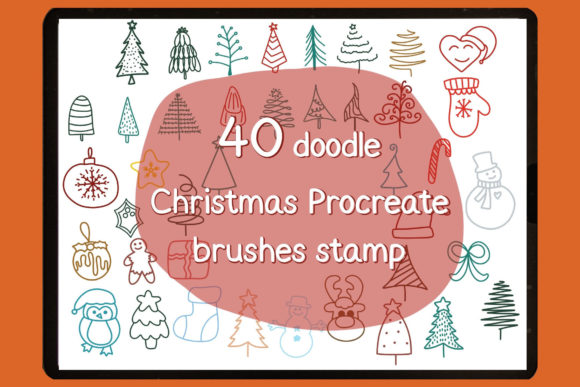
The core value of this specific brush set lies in its targeted design and seamless integration into the Procreate ecosystem. Comprising a single .brushset file containing 40 distinct stamp brushes, this collection is engineered specifically for the iPad environment. It requires Procreate version 5 or higher, ensuring compatibility with the app's most stable rendering engines and layer management systems. For professionals who rely on Procreate as their primary illustration tool, understanding how to integrate these stamps into existing processes can transform a chaotic holiday rush into a streamlined, manageable operation.
Strategic Integration into Creative Pipelines
Integrating new assets into a workflow requires more than just downloading a file; it demands a strategic approach to when and how these tools are deployed. The Doodle Christmas Procreate Brushes are versatile enough to fit into various stages of a project lifecycle, from initial concepting to final polish.
Pre-Production and Concepting
Before a single pixel is committed to a final canvas, these brushes serve as excellent mood-boarding tools. When planning a holiday campaign for a client or sketching out ideas for a personal product line, speed is essential. Instead of drawing intricate holly leaves, snowflakes, or ornaments from scratch during the brainstorming phase, creators can use the stamp brushes to rapidly populate a canvas with thematic elements. This allows for quick visualization of composition and balance. Marketers can mock up ad concepts in minutes rather than hours, presenting stakeholders with tangible visuals that convey the festive spirit without requiring finished artwork.
Execution and Asset Creation
During the active creation phase, the utility of these 40 stamps shifts toward efficiency and consistency. For freelancers producing a series of Instagram stories or a blogger creating a week's worth of holiday headers, maintaining a consistent visual language is crucial. Using the same set of doodle stamps ensures that every piece of content feels part of a cohesive brand identity. Because these are stamp brushes, they eliminate the variability of hand-drawing the same element repeatedly. This uniformity is particularly valuable for small business owners creating packaging labels or thank-you notes, where brand recognition relies on repetitive visual cues.
Post-Production and Embellishment
Even after the main illustration or layout is complete, these brushes offer a non-destructive way to add finishing touches. A flat design might feel too sterile for the holidays; adding a scattered overlay of hand-drawn stars or whimsical baubles using the stamp set can instantly warm up the aesthetic. Since they operate as individual brush strokes within Procreate, they reside on their own layers (if configured correctly) or can be easily masked, allowing for precise control over opacity and blending modes. This flexibility supports rigorous quality control, ensuring that embellishments enhance rather than clutter the final deliverable.
Technical Setup and Compatibility Management
A smooth workflow begins with proper installation. One of the advantages of the Procreate ecosystem is its straightforward asset management, but adhering to the correct procedure prevents technical friction later. The Doodle Christmas Procreate Brushes are distributed as a single .brushset file. This format is exclusive to the Procreate application and will not function in other software such as Photoshop or Affinity Designer, a limitation that underscores the importance of having the correct environment ready.
To ensure optimal performance, users must verify they are running Procreate version 5 or higher. Older versions may lack the rendering capabilities required for complex stamp textures or may fail to recognize the file structure entirely. Once the version check is complete, the installation process is designed to be immediate:
- Download the Asset: After completing the purchase, download the
.brushsetfile directly to your iPad. Saving it to the "Files" app in a dedicated "Design Assets" folder is recommended for long-term organization. - Locate the File: Navigate to the download location using the Files app. Identify the specific
.brushsetfile associated with the Christmas collection. - Trigger Installation: Tap the file once. Procreate should launch automatically (or come to the foreground), and the brush set will import instantly into your Brush Library. There is no need for manual unzipping or dragging and dropping if the file association is set correctly.
- Verify Installation: Open your current project or start a new canvas. Tap the brush icon in the top right corner to open the Brush Library. Scroll through the list to find the newly added set, typically named "Doodle Christmas" or similar, containing the 40 stamps.
- Begin Usage: Select a stamp and test it on a blank layer to confirm size and texture fidelity before applying it to client work.
This streamlined setup minimizes downtime, allowing creators to move from purchase to production almost immediately. For teams managing multiple iPads, this process can be replicated across devices by sharing the .brushset file via AirDrop or cloud storage, ensuring that all team members are working with identical assets.
Optimizing Workflow Efficiency and Organization
While the installation is simple, maximizing the return on investment requires thoughtful organization within the app. Professional users often manage dozens of brush sets, which can lead to library clutter. To maintain efficiency, consider creating a specific "Seasonal" group within the Procreate Brush Library. Move the Doodle Christmas Procreate Brushes into this group at the top of the list during the holiday season. Once January passes, you can archive the set by moving it to a "Archive" folder or deleting it from the device (since you retain the original download file) to keep the active workspace lean.
Furthermore, understanding the interaction between these stamps and other Procreate features enhances their utility. For instance, combining these doodle stamps with Procreate's Clipping Masks allows for textured fills within specific shapes, ideal for creating custom holiday typography. Using the Alpha Lock feature enables users to colorize the black-and-white stamps instantly without affecting the transparency, facilitating rapid iteration on color schemes to match different brand palettes.
Consistency in output is another key factor. When using stamp brushes, it is easy to fall into the trap of repetitive patterns. To avoid a "copy-paste" look, vary the scale and rotation of each stamp manually. Procreate allows for quick adjustments via the Transform tool. Additionally, experimenting with layer blend modes—such as Multiply for darker integration or Screen for glowing effects—can make the static stamps feel dynamic and integrated into the hand-drawn aesthetic of the rest of the artwork.
Long-Term Value and Reusability
Investing in niche assets like the Doodle Christmas Procreate Brushes is not merely a one-season solution. High-quality digital assets have a long shelf life. For educators teaching digital illustration, these stamps serve as excellent teaching aids for demonstrating composition and layering techniques. For publishers and bloggers, they provide a reusable library of elements that can be repurposed annually, saving countless hours in future holiday cycles. The initial time invested in learning the nuances of these 40 stamps pays dividends year after year.
Moreover, the exclusivity of the format (.brushset for Procreate only) ensures that the user base remains focused on a platform known for its intuitive touch controls and Apple Pencil integration. This specialization means the brushes are optimized for the specific pressure sensitivity and tilt mechanics of the iPad, offering a natural drawing experience that generic image overlays cannot match.
In conclusion, the successful adoption of the Doodle Christmas Procreate Brushes hinges on viewing them as functional components of a broader creative strategy. By ensuring technical compatibility, organizing assets logically, and leveraging Procreate's advanced layer features, professionals can elevate their holiday output. Whether used for rapid prototyping, mass content creation, or detailed illustration refinement, these tools bridge the gap between creative vision and practical execution, allowing creators to meet seasonal demands with confidence and style.