Evaluating the 40 Liquid Foil Brushes for Procreate Collection
Digital artists working within the Procreate ecosystem on iPad are constantly seeking tools that bridge the gap between traditional media textures and modern digital efficiency. One specific resource gaining attention is the 40 Liquid Foil Brushes for Procreate collection by Infinity Art Works. This set is designed to replicate the shimmering, reflective qualities of metallic foils, offering a specialized texture library for illustrators, letterers, and graphic designers. Understanding the capabilities, limitations, and ideal use cases for this toolset is essential for determining whether it aligns with your current workflow and artistic goals.
Understanding the Toolset
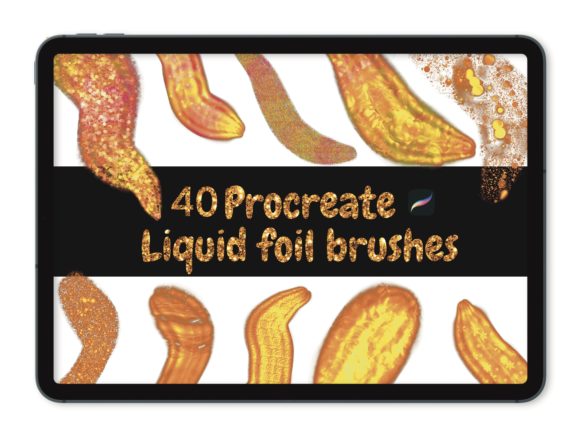
The 40 Liquid Foil Brushes for Procreate is a digital asset pack containing forty distinct brush presets. Unlike standard flat-color brushes, these are engineered to simulate the behavior of liquid metal or foil transfer applications. When applied to the canvas, they create strokes that possess depth, shine, and a metallic sheen, mimicking materials like gold leaf, silver foil, or holographic finishes.
Technically, these brushes function exclusively within the Procreate application on iPad devices. They rely heavily on the pressure sensitivity features of the Apple Pencil or compatible third-party styluses. This dependency means the variation in stroke width, opacity, and texture intensity is directly tied to how hard the user presses and the angle at which the stylus is held. The collection is delivered as a downloadable file; upon purchase confirmation, users receive an email with a link to download the brush set, which is then imported directly into the Procreate brush library.
Why Artists Consider Metallic Textures
The decision to incorporate metallic elements into digital artwork often stems from a desire to add luxury, dimension, or focal points to a composition. In traditional art, achieving a realistic foil effect requires physical materials such as adhesive size and delicate sheets of metal leaf, a process that is messy, time-consuming, and difficult to correct once applied. Digital alternatives aim to solve these friction points.
Artists researching the 40 Liquid Foil Brushes for Procreate are typically looking for efficiency without sacrificing aesthetic quality. These brushes allow for rapid experimentation with metallic accents in typography, character design, and background elements. For example, a calligrapher can apply a "gold" stroke to a letterform and immediately see how it interacts with underlying colors, something that would take significantly longer to achieve manually. The "liquid" aspect of these brushes suggests a flowy, organic application, making them particularly suitable for designs that require a sense of movement rather than rigid, geometric metallic shapes.
Benefits and Practical Advantages
One of the primary benefits of this collection is the non-destructive nature of digital foil. If a stroke does not look right, it can be undone or erased instantly, allowing for a trial-and-error approach that encourages creativity. Furthermore, because these are brushes rather than static image overlays, they retain the dynamic quality of hand-drawn lines. The pressure sensitivity ensures that no two strokes are exactly identical, preserving the human touch in the artwork.
The variety within the set—forty different brushes—provides a range of textures. Some may offer a smooth, polished chrome look, while others might simulate crumpled foil or scattered metallic particles. This diversity allows an artist to build complex layers of texture within a single piece without needing to switch between different apps or import external images. For users who already work primarily in Procreate, having these tools native to the app streamlines the workflow, keeping all assets and layers in one file.
Considerations and Tradeoffs
While the 40 Liquid Foil Brushes for Procreate offer significant advantages, there are important tradeoffs to consider before purchasing. The most critical limitation is compatibility. These brushes will only work in the Procreate app on iPad. They are not compatible with Procreate Pocket (iPhone version) in all contexts, nor do they function in desktop software like Adobe Photoshop, Clip Studio Paint, or Affinity Designer. Artists who maintain a hybrid workflow between tablet and desktop may find this restrictive.
Additionally, the visual result of these brushes is dependent on the canvas settings and the colors chosen beneath them. A foil brush often relies on blending modes and underlying hues to create the illusion of reflection. If used on a flat, single-color background without consideration for lighting logic, the effect can appear artificial or "sticker-like." Users must have a foundational understanding of light and shadow to maximize the potential of these tools. The brushes provide the texture, but the artist must still provide the lighting context.
There is also the factor of file management. Importing forty new brushes can clutter an existing library if not organized correctly. Users need to be comfortable with the Procreate interface to create dedicated brush sets and manage their imports effectively. Finally, since this is a digital download, there is no physical product; the value is entirely in the utility the brushes provide to the user's specific style.
Ideal Use Cases
This collection is a strong fit for specific types of projects. It is particularly well-suited for:
- Digital Lettering and Calligraphy: Adding metallic accents to wedding invitations, logos, or social media quotes where a premium feel is desired.
- Fantasy Illustration: Creating armor, jewelry, or magical effects that require a shimmering, otherworldly quality.
- Pattern Design: Developing seamless patterns with foil elements for textile or wallpaper mockups.
- Quick Mockups: Visualizing how a foil stamp would look on packaging design before committing to a physical print run.
In these scenarios, the ability to quickly toggle between different foil textures allows for rapid iteration and client presentation.
When to Consider Alternatives
Conversely, there are situations where alternative solutions may be more appropriate. If an artist requires absolute photorealism that matches specific Pantone metallic ink standards for print production, dedicated vector software with specialized gradient meshes or high-resolution scanned textures might yield more precise results. Similarly, if the goal is to create animated metallic effects, using layer styles in desktop software or dedicated motion graphics tools might offer more control over keyframing and light movement than static Procreate brushes.
Furthermore, artists who do not own an iPad or prefer working with a mouse and keyboard should look for desktop-equivalent brush packs or texture overlays. The reliance on pressure sensitivity is central to the experience of the 40 Liquid Foil Brushes for Procreate; without a pressure-sensitive stylus, the brushes will not perform as intended, rendering the purchase ineffective.
Making the Decision
Deciding whether to invest in this brush set comes down to evaluating your current hardware and artistic objectives. If you are an iPad-based artist who frequently incorporates metallic elements into your work and values speed and organic texture, this collection offers a practical solution. It removes the technical barriers of simulating foil manually while providing a diverse palette of forty options to explore.
However, if your workflow is strictly desktop-based, or if you require industrial-grade precision for large-scale print manufacturing, you may need to supplement these brushes with other tools or seek alternative methods. Ultimately, the 40 Liquid Foil Brushes for Procreate serve as a specialized enhancement to the digital painter's toolkit, best utilized by those who understand how to leverage pressure sensitivity and blending modes to create convincing, luminous artwork.