Mastering Winter Digital Art with Snowflakes Brushes for Photoshop and Procreate
Capturing the delicate, intricate beauty of falling snow in digital art is a challenge that many illustrators and designers face. While standard round brushes can create simple dots, they often lack the unique geometry and organic variation required to make a winter scene feel authentic and magical. This is where specialized tools become essential. Snowflakes Brushes offer a targeted solution for artists looking to elevate their cold-weather compositions without spending hours hand-drawing every individual crystal. Whether you are working on a holiday greeting card, a fantasy landscape, or a subtle texture overlay, having the right assets can transform a flat image into an immersive experience.
The primary goal for most adults seeking these resources is efficiency combined with high-quality results. In a professional workflow, time is a critical resource. Drawing complex hexagonal structures repeatedly is not only tedious but can also lead to repetitive patterns that look unnatural. The need arises for a toolset that provides variety, ease of use, and compatibility across different platforms. Snowflakes Brushes address these needs by providing a curated collection of pre-designed stamps that mimic the randomness and diversity of real snowfall. By integrating these tools into your workflow, you shift your focus from the mechanics of drawing shapes to the artistic decisions of composition, lighting, and atmosphere.
Overcoming the Challenges of Digital Snow Effects
Creating realistic snow involves more than just scattering white pixels across a canvas. Real snowflakes vary in size, opacity, and shape depending on their distance from the viewer and the atmospheric conditions. A common pitfall for digital artists is the "stamped" look, where every snowflake appears identical, breaking the illusion of depth. Another significant hurdle is cross-platform compatibility. Many artists switch between desktop software like Adobe Photoshop and mobile applications like Procreate on the iPad. Historically, finding brush sets that work seamlessly on both ecosystems has been difficult, often requiring separate purchases or complex file conversions.
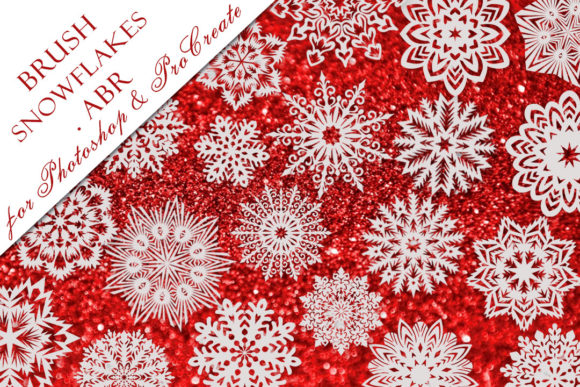
Snowflakes Brushes are designed specifically to mitigate these friction points. The collection typically comes in a convenient .ABR ZIP folder, containing 20 distinct snowflake brushes. The .ABR format is the industry standard for Photoshop, but its utility extends further when paired with modern workflows that support these files in Procreate as well. This universal compatibility means you can start a project on your desktop and refine it on your tablet without losing access to your essential tools. The inclusion of 20 variations ensures that you have enough diversity to prevent pattern repetition, allowing for a natural distribution of ice crystals that mimics the chaos of a real blizzard or the gentle drift of a quiet snowfall.
Practical Applications and Creative Outcomes
The versatility of this brush set opens up a wide range of practical applications for various types of creators. For graphic designers, these brushes are invaluable for seasonal marketing materials. Imagine creating a banner for a winter sale or a social media post for a holiday event. Instead of searching for stock photos that may not match your color grade or resolution, you can paint custom snow overlays that blend perfectly with your brand's aesthetic. The ability to control the density and placement of the snow allows for a polished, professional finish that generic filters often fail to achieve.
For digital painters and concept artists, Snowflakes Brushes serve as a foundational element in environment design. When illustrating a frozen tundra or a cozy cabin scene, the atmosphere is key. These brushes allow you to build depth by layering different sizes of snowflakes. You can use larger, more detailed flakes in the foreground to create a sense of proximity, while using smaller, softer stamps in the background to suggest distance and atmospheric perspective. This technique adds a three-dimensional quality to two-dimensional artwork, drawing the viewer into the scene.
Furthermore, these tools are excellent for photo manipulation. Photographers and retouchers often need to add weather effects to images taken on clear days to match a specific mood or campaign theme. Using a dedicated snowflake brush set allows for non-destructive editing. You can paint snow onto a separate layer, adjust the opacity, apply motion blur to simulate wind, or change the blending mode to "Screen" or "Overlay" for seamless integration. The result is a composite that looks believable rather than artificially pasted on.
Tailoring the Workflow to Your Needs
Different users will approach the implementation of Snowflakes Brushes based on their specific goals and skill levels. Beginners might find the greatest value in the immediacy of the results. With just a few clicks, they can achieve an effect that would otherwise take weeks of practice to master manually. This instant gratification can be highly motivating, encouraging new artists to experiment with winter themes they might have previously avoided due to technical difficulty.
Experienced professionals, on the other hand, will appreciate the time-saving aspect and the granular control offered by the 20-brush variety. They may use these brushes as a base layer, painting over them with custom highlights and shadows to integrate them further into the lighting of the scene. Some advanced users might even modify the brush settings—such as scatter, size jitter, and opacity flow—to create entirely new variations derived from the original set. The compact size of the file, approximately 2500 KB, ensures that the brushes load quickly and do not bog down the software, which is crucial when working on large, high-resolution files with multiple layers.
Installation and Ease of Use
One of the most significant advantages of this specific collection is the streamlined installation process. In an era where digital assets often come with complicated instructions or require multiple steps to import, this set prioritizes user convenience. The entire collection is contained within a single .ABR ZIP folder. Once downloaded and unzipped, the file can be installed in one go. For Photoshop users, this typically involves double-clicking the .ABR file or importing it through the Brush panel. Procreate users can import the same file directly into their brush library. This "install in one file" approach removes technical barriers, allowing you to start creating almost immediately after purchase.
When selecting digital assets, reliability and support are also key considerations. Knowing that there is a point of contact for assistance adds a layer of trust to the transaction. If you encounter any issues during installation or have questions about how to best utilize the brushes for a specific project, reaching out to the creator, Svetlana, ensures that you are not left troubleshooting alone. This level of customer care is often what distinguishes a high-quality resource from a generic download found on obscure forums.
Making the Most of Your Winter Artistry
To get the best results from Snowflakes Brushes, consider experimenting with layer blending modes and color adjustments. While snow is technically white, in a realistic environment, it reflects the colors of the sky and surrounding light sources. Try sampling colors from your background and painting with the brushes on a low-opacity setting to create colored snow that fits the scene's lighting. Additionally, combining the snow brushes with wind effects or motion blur can dynamicize a static image, suggesting a storm in progress.
Ultimately, the value of these brushes lies in their ability to solve a specific creative problem with elegance and efficiency. They bridge the gap between technical limitation and artistic vision, providing the necessary tools to bring winter scenes to life. Whether you are a hobbyist looking to add a festive touch to your personal projects or a professional designer delivering client work under tight deadlines, this collection offers a robust, versatile, and user-friendly solution. By leveraging these 20 unique brushes, you can ensure that your winter artwork stands out with clarity, depth, and a touch of genuine seasonal magic.
Thank you for visiting the store and exploring these creative resources. If you have any questions regarding the product or need guidance on implementation, please do not hesitate to contact Svetlana. Happy creating, and may your winter landscapes be filled with beautiful, perfectly placed snowflakes.