10 Plaids Procreate Brushes for Textured Art
Seamless and repeated patterns are powerful tools in digital design because they generate immediate interest, add rich texture, and create a natural flow across a canvas. Whether you are designing a new product package, creating assets for a website, or simply adding depth to a personal illustration, the right pattern can transform a flat image into something tactile and engaging. This is where the 10 Plaids Procreate Brushes collection becomes an essential addition to your digital toolkit. By integrating these plaid brushes into your artwork, you tap into a design technique that has long been a staple in product design, graphic design, and web development.
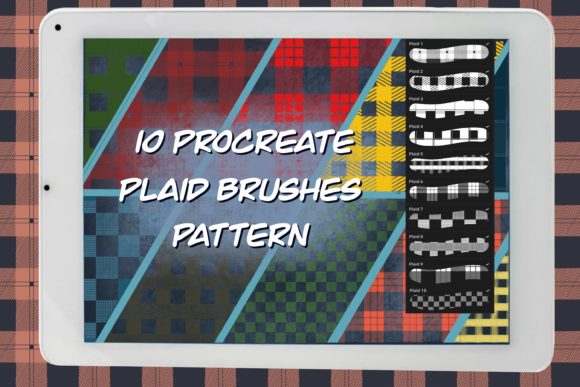
At its core, this collection offers ten distinct plaid patterns optimized specifically for the Procreate app on iPad. Unlike standard images that might pixelate when stretched, these are functional stamp brushes. This means they are incredibly flexible; you can scale them up or down without losing quality, adjust their opacity to blend softly with underlying layers, or recolor them instantly to match your brand palette or artistic vision. The appeal lies in their simplicity and efficiency. Instead of spending hours drawing intersecting lines to create a perfect tartan or check, you can achieve professional results with a single tap.
Why Designers Choose Plaid Patterns
Plaid is more than just a fashion statement; it is a versatile structural element in visual communication. For entrepreneurs and small business owners, consistency is key. Using a consistent plaid texture across packaging, social media posts, and website backgrounds helps build a recognizable brand identity. The 10 Plaids Procreate Brushes allow you to maintain this consistency effortlessly. Because the patterns are seamless, they can be tiled infinitely, making them perfect for wrapping around 3D mockups of boxes, bottles, or bags.
For bloggers and content creators, texture adds a layer of sophistication that plain colors often lack. A subtle plaid background can make text pop without being distracting, while a bold, high-contrast plaid can serve as a striking focal point for a promotional graphic. Educators and freelancers also find value here; creating handouts, presentation slides, or educational materials with a cohesive, textured look can make the content feel more curated and professional. The ability to quickly swap between ten different styles means you can adapt your visuals to fit seasonal themes, such as cozy autumn vibes or crisp winter holidays, in seconds.
Practical Applications Across Industries
The utility of these brushes extends far beyond simple decoration. In the realm of product and package design, these brushes simulate the look of woven fabric or printed paper, giving clients a realistic preview of how a final product might appear. A freelance designer working on a coffee bag label, for instance, can use one of the stamp brushes to create a rustic, homespun feel that suggests quality and tradition.
In graphic and web design, these patterns are excellent for creating dividers, headers, or background overlays. Because you can change the opacity, you can lay a plaid pattern over a photograph to create a unified color grade or a vintage aesthetic. This technique is particularly useful for marketers who need to produce high volumes of visual content quickly. Instead of searching for stock photos that may not quite fit, you generate your own unique textures on the fly.
Even for hobbyists and casual users, the learning curve is non-existent. You do not need to understand complex vector mathematics or masking techniques. The process is intuitive: choose a stamp from your brush library, select your desired color from the palette, and tap your screen with your finger or Apple Pencil. The pattern appears instantly, ready to be moved, resized, or rotated to fit your composition perfectly.
Technical Features and Flexibility
One of the most significant advantages of using stamp brushes over importing static images is control. With the 10 Plaids Procreate Brushes, you retain full editing power. If a pattern feels too heavy for your composition, you can lower the opacity to let the canvas texture show through. If the scale is wrong, you can pinch and zoom the stamp before placing it, or resize it afterward just like any other drawn element. Furthermore, because these are native Procreate brushes, they respond to the app's blending modes. You can set a plaid layer to "Multiply" to darken the areas beneath it or "Overlay" to create a vibrant, integrated look.
It is important to note that these tools are compatible with Procreate only. They are engineered to leverage the specific engine of the iPad app, ensuring smooth performance and crisp edges. This specialization means you get a tool that works flawlessly within your existing workflow, without the need for external plugins or complicated workarounds.
How to Install and Use Your New Brushes
Getting started with your new assets is a straightforward process, designed to get you creating immediately after purchase. When you download the product, you will receive a single ZIP file containing one `.brushset` file. This consolidated file holds all 10 plaid patterns, keeping your library organized.
To install them, follow these simple steps:
- Download and Unzip: After purchasing, download the files to your device. Zipped files must be unzipped to access the content. Open your preferred unzipping app (or the native Files app on iOS), locate the downloaded ZIP file, and select "Unzip."
- Import to Procreate: Once unzipped, tap the file and select "Open in..." or "Share," then choose Procreate from the list of apps. This action will automatically import the entire brush set into your Procreate Brush Library.
- Locate and Use: Open Procreate and navigate to your Brush Library. You will find a new folder labeled with the name of the set. Inside, you will see the 10 individual plaid stamps.
- Create: Select a brush, pick a color, and tap anywhere on your canvas. The pattern will stamp down instantly.
Before diving in, consider the resolution of your canvas. While these stamps are scalable, starting with a high-resolution canvas ensures that if you decide to enlarge the pattern significantly later, the details remain sharp. Also, experiment with different color combinations. Plaid relies on the interplay of colors; sometimes a monochromatic scheme offers a subtle elegance, while contrasting colors create energy.
Ultimately, adding these brushes to your repertoire is about expanding your creative vocabulary. They solve the problem of repetitive manual labor, allowing you to focus on the bigger picture of your design. Whether you are a seasoned professional looking to speed up your workflow or a beginner eager to add professional textures to your first digital painting, these tools provide a reliable, high-quality foundation for your next project.